Enterprise Billing
Manage your Enterprise subscription, track included minutes, and monitor overage usage.
Enterprise Billing
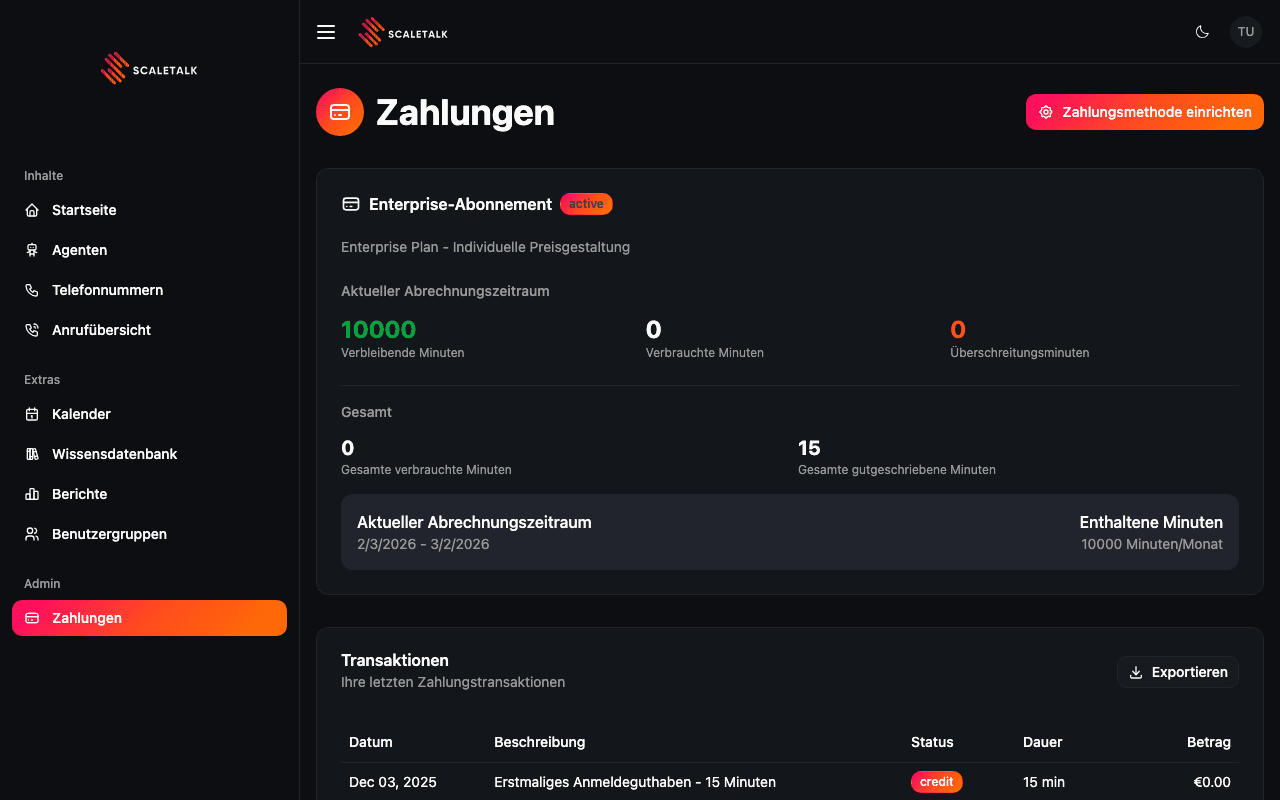
Enterprise accounts have a monthly subscription that includes a set number of call minutes. The Payments page displays your subscription details, current usage, and billing period information.
Subscription Card
The main card shows your Enterprise subscription status and usage at a glance.
Subscription Header
The header displays:
- Enterprise-Abonnement (Enterprise Subscription) label
- Status badge -- green "active" when your subscription is current
- Plan name and pricing model (e.g., "Enterprise Plan - Custom Pricing")
Current Billing Period
The billing period section shows three key metrics:
| Metric | Description |
|---|---|
| Verbleibende Minuten (Minutes Remaining) | Unused minutes in the current billing period, shown in green |
| Verbrauchte Minuten (Minutes Used) | Total minutes consumed this period |
| Uberschreitungsminuten (Overage Minutes) | Minutes used beyond your included allowance, shown in orange |
All-Time Statistics
Below the current period, you can see cumulative usage:
| Metric | Description |
|---|---|
| Gesamte verbrauchte Minuten (Total Minutes Used) | All-time minutes consumed across all billing periods |
| Gesamte gutgeschriebene Minuten (Total Credited Minutes) | All-time minutes credited to your account |
Billing Period Details
A summary bar at the bottom of the card shows:
- Current billing period dates (e.g., 2/3/2026 - 3/2/2026)
- Included minutes per month (e.g., 10,000 Minutes/Month)
Overage Charges
If you exceed your included minutes, overage charges are calculated at your contracted per-minute rate. These charges appear on your next invoice. Monitor the orange overage counter to stay within your plan.
Payment Method Setup
Click the Zahlungsmethode einrichten (Set Up Payment Method) button in the top-right corner to configure your payment method. This opens a Stripe-powered form for securely adding a credit card.
Enterprise accounts may also need to set up a payment method during initial onboarding before the subscription becomes active.
Managing Your Subscription
Enterprise subscriptions are configured by the ScaleTalk team during onboarding. To make changes to your plan:
- Upgrade included minutes -- Contact your account manager
- Change billing cycle -- Contact support to switch between monthly and annual billing
- Cancel subscription -- Available through the subscription management interface
Contract Terms
Enterprise plans may have minimum contract durations. Check your agreement before making changes to your subscription.