Transaction History
View, filter, and export your payment and usage transaction records.
Transaction History
The Transactions section appears at the bottom of the Payments page for all account types. It provides a complete log of all credits, debits, and payments on your account.
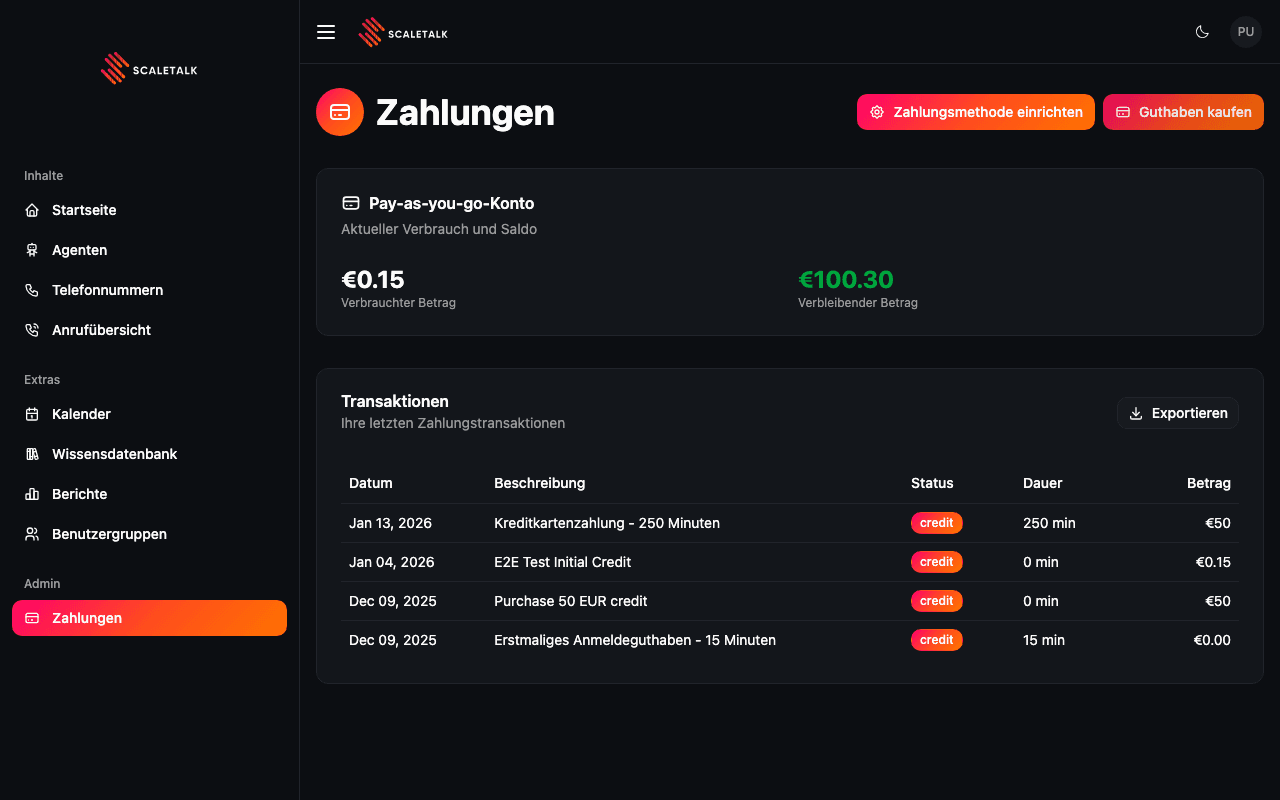
Transaction Table
Each transaction entry shows:
| Column | Description |
|---|---|
| Datum (Date) | When the transaction occurred |
| Beschreibung (Description) | Details of the transaction (e.g., "Kreditkartenzahlung - 250 Minuten") |
| Status | Transaction type badge -- credit (green) for incoming funds, debit (red) for charges |
| Dauer (Duration) | Minutes associated with the transaction (if applicable) |
| Betrag (Amount) | Euro amount of the transaction |
Transaction Types
You may see the following transaction types in your history:
| Type | Description | Status |
|---|---|---|
| Credit card payment | Manual credit purchase | credit |
| Initial credit | Welcome bonus on account creation | credit |
| Purchase credit | Additional credit top-up | credit |
| Auto-recharge | Automatic credit top-up | credit |
| Call usage | Minutes consumed by a call | debit |
| Overage charge | Enterprise minutes beyond included allowance | debit |
Pagination
Transactions are displayed 10 per page. Use the pagination controls at the bottom of the table to navigate between pages when you have more than 10 transactions.
Exporting Transactions
Click the Exportieren (Export) button in the top-right corner of the Transactions card to download your complete transaction history as an Excel (.xlsx) file.
The export includes all transactions (not just the current page) and contains the following columns:
- Date
- Description
- Status (credit/debit)
- Duration (minutes)
- Amount (EUR)
Export for Accounting
The Excel export is suitable for importing into accounting software or for record-keeping purposes. The file is named with the current date (e.g., transactions_2026-02-07.xlsx).