Managing API keys
Create, scope and revoke keys for the public ScaleTalk API.
Settings → API keys is where you manage access keys for the public ScaleTalk API. They let you drive agents, phone numbers, campaigns and calls programmatically, for example from your own backend or an automation tool like n8n.
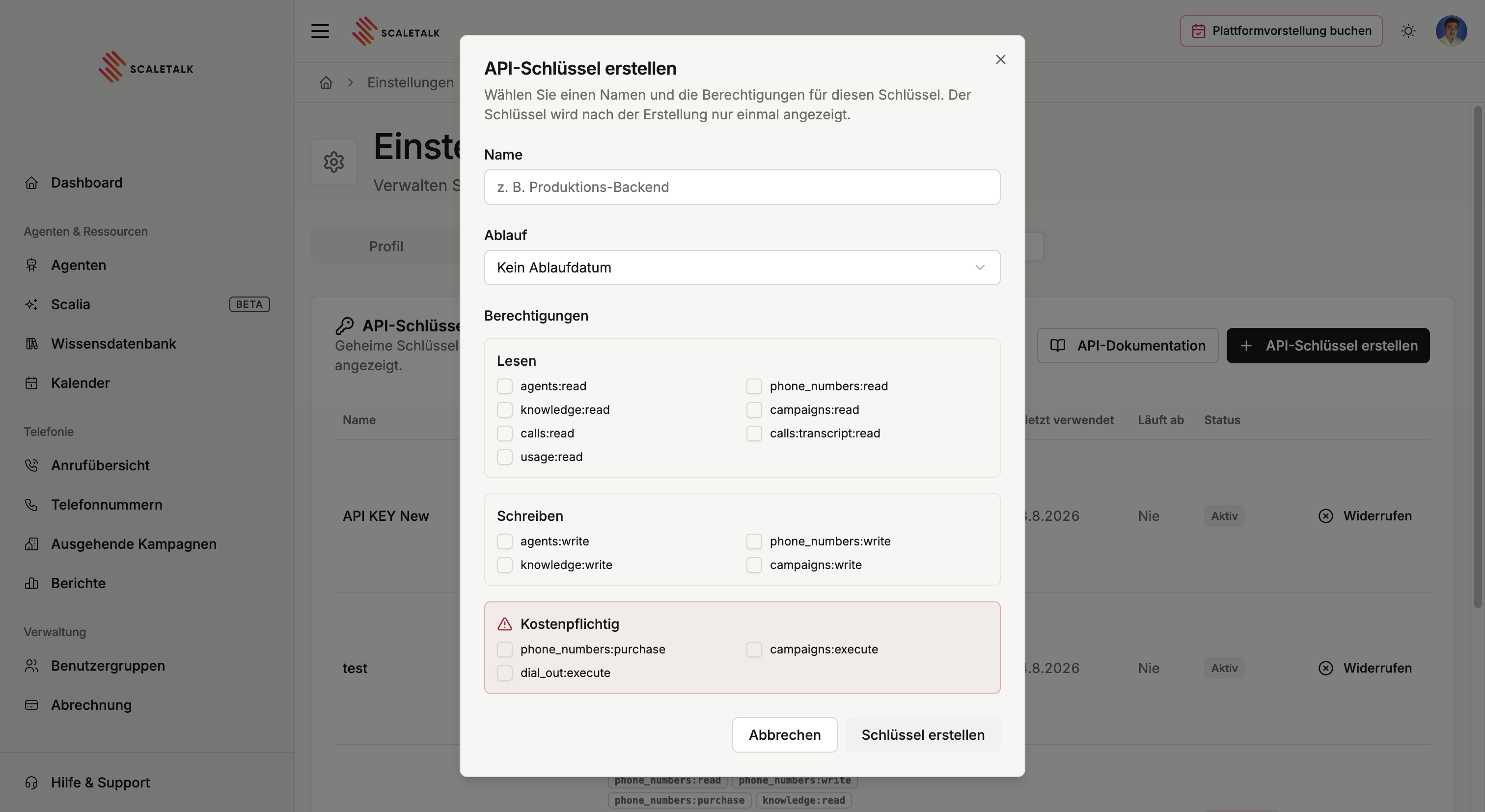
Creating a key
Create API key adds a new key. You give it a name and pick its permissions.
The key is shown exactly once
After creation you see the full key a single time. The overview afterwards only shows a truncated remainder such as sk_live_QuS8…. Copy it straight into your password manager or the target application. If it is lost, the only remedy is a new key.
Permissions
Every key carries a list of permissions. They follow a scope:action pattern and are individually selectable:
| Area | Permissions |
|---|---|
| Agents | agents:read, agents:write |
| Phone numbers | phone_numbers:read, phone_numbers:write, phone_numbers:purchase |
| Knowledge base | knowledge:read, knowledge:write |
| Campaigns | campaigns:read, campaigns:write, campaigns:execute |
| Calls | calls:read, calls:transcript:read |
| Dialling | dial_out:execute |
| Usage | usage:read |
Three of them deserve particular care, because they cost money or place calls:
phone_numbers:purchasebuys numbers and creates recurring cost.campaigns:executestarts campaigns, and with them real outbound calls.dial_out:executeplaces individual outbound calls.
As little as possible
Issue one key per use case, carrying exactly the permissions that case needs. A reporting script that only pulls figures gets by on calls:read and usage:read and should never be able to dial. A key with every permission sitting in an automation tool is the most common avoidable mistake.
The overview
The table shows, per key:
| Column | Meaning |
|---|---|
| Name | Your label, typically the application using it |
| Key | Truncated preview for recognition |
| Permissions | The granted scopes |
| Created | Creation date |
| Last used | Most recent access, or Never |
| Expires | Expiry date, or Never |
| Status | Active or Revoked |
Last used is the most useful column when tidying up: a key that has read Never for months is needed by nothing and can go.
Revoking and deleting
Revoke invalidates an active key immediately. Any integration still using it starts receiving errors from that moment. The entry stays in the list so its existence remains traceable.
An already revoked key can additionally be deleted, which removes it from the overview entirely.
Revoke immediately if a key escapes
If a key ends up in a repository, a screenshot or a shared document, revoke it and issue a new one. A key with campaigns:execute or dial_out:execute can run up real telephony costs in the wrong hands.
Using a key
The key goes into the Authorization header as a bearer token:
curl https://app.scaletalk.ai/api/public/v1/agents \
  -H "Authorization: Bearer sk_live_..."
Which endpoints exist is covered under Endpoints. The complete, always-current reference lives in the interactive API documentation.