Knowledge Base
Upload and manage documents to provide your AI agents with contextual information during calls.
The Knowledge Base is a centralized document store that provides your AI agents with contextual information. When a caller asks a question, your agent can search uploaded documents to deliver accurate and up-to-date answers.
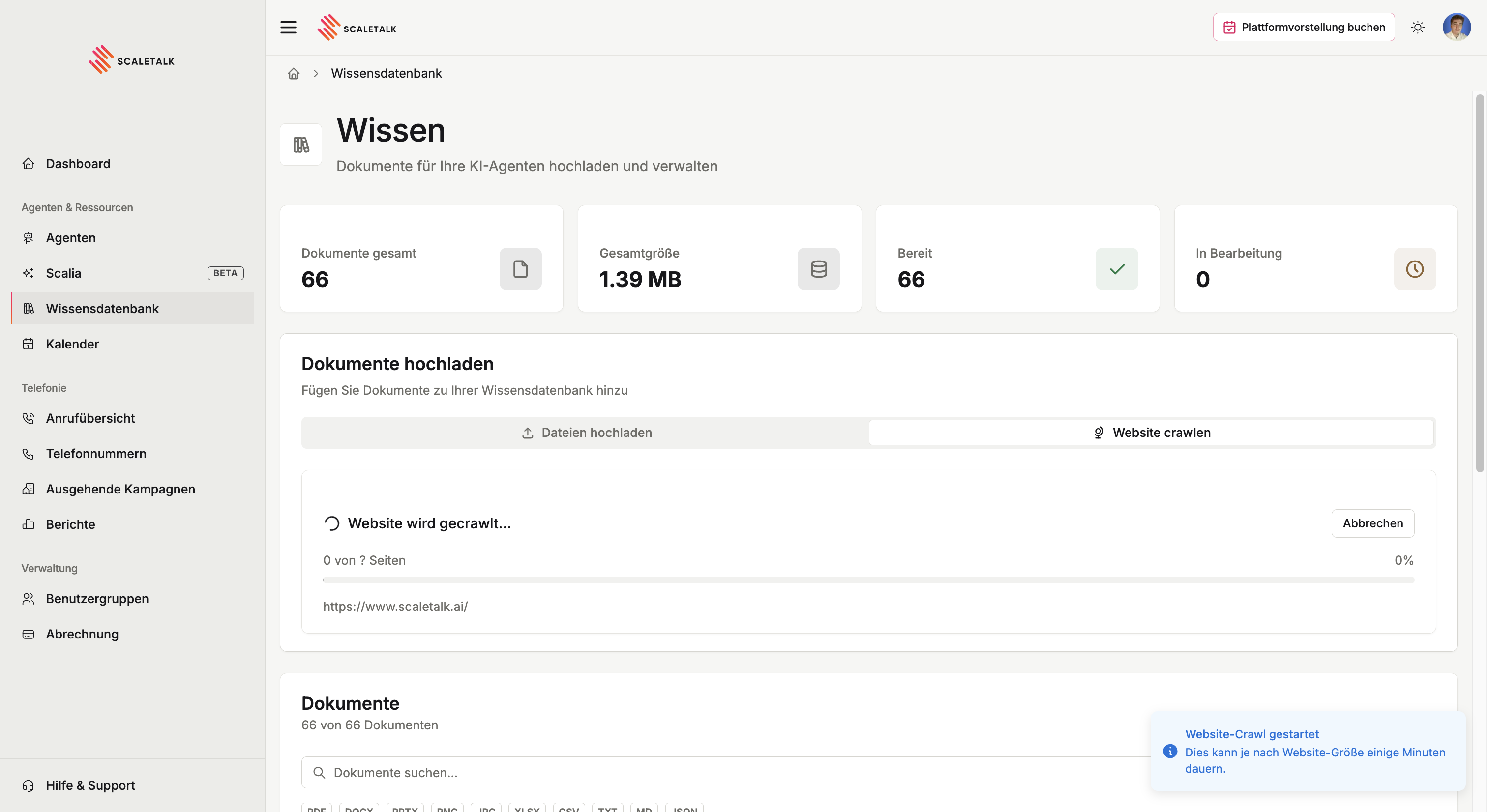
Overview
The Knowledge page provides:
- Document upload via drag-and-drop or file picker
- Website crawling to import content from web pages
- Document management with search, filters, and sorting
- Processing status tracking as documents are analyzed and indexed
Statistics Dashboard
At the top of the page, four cards summarize your knowledge base:

| Metric | Description |
|---|---|
| Total Documents | Number of documents in your knowledge base |
| Total Size | Combined file size of all documents |
| Ready | Documents that have been processed and are available to agents |
| Processing | Documents currently being analyzed and indexed |
How It Works
When you upload a document, ScaleTalk processes it through several stages:
- Upload - The file is uploaded to secure storage
- Extraction - Text content is extracted (OCR for images/PDFs, parsing for text files)
- Chunking - Content is split into searchable chunks
- Embedding - Chunks are converted into vector embeddings for semantic search
- Ready - The document is indexed and available to your agents
Once processed, any agent with access to the knowledge base can search these documents during calls to answer caller questions accurately.
Supported File Types
ScaleTalk accepts a wide range of document formats:
| Category | Formats |
|---|---|
| Documents | PDF, DOCX, PPTX |
| Images (OCR) | PNG, JPG, GIF, WebP |
| Spreadsheets | XLSX, XLS, CSV, TSV |
| Text Files | TXT, MD, JSON, XML, YAML, LOG |
Maximum file size: 50 MB per file.
Group Context
If you use User Groups, the Knowledge Base is context-aware. Documents uploaded in a group context are shared with all group members and their agents. Documents uploaded in your personal context are only visible to you.
Next Steps
- Uploading Documents - Learn how to add documents via upload or web crawling
- Managing Documents - Search, filter, rename, and delete documents