Caller context
Recognise the caller before they say a word — via CSV or an API lookup.
Without caller context your agent has to ask every caller for their name, customer number and reason for calling. With it, the very first sentence can be:
"Good afternoon, Ms Weber. Good to hear from you — is this about the Acme GmbH case again?"
Caller lookup resolves the caller's phone number before the greeting is spoken and makes what it finds available as variables.
Real calls only
Caller lookup applies to inbound calls on a real phone number only. A browser test call transmits no caller number, so there is nothing to look up. To test a personalised greeting you have to actually ring the agent.
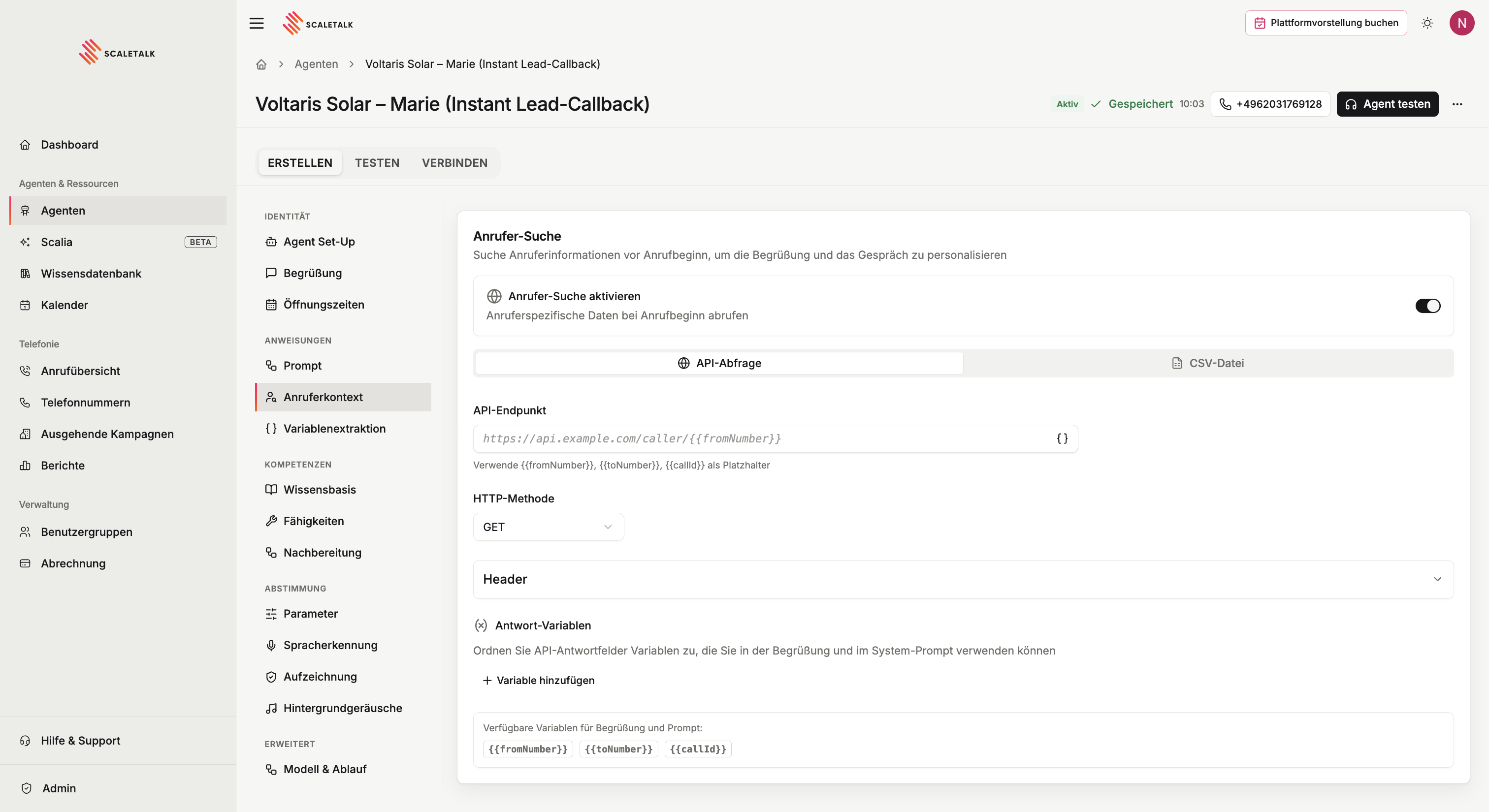
Enabling it
Under Instructions → Caller context, switch on Enable caller lookup. Two tabs appear:
| Mode | What you provide | When it fits |
|---|---|---|
| CSV file | An uploaded contact list | You have an Excel or CRM export but no API |
| API query | An HTTPS endpoint of yours | You run a CRM or database that can expose a read endpoint |
The rest of the agent works identically — in both cases the results are ordinary {{variables}}.
Where the values land
A hit takes effect in three places at once:
- In the greeting — placeholders are filled before the caller hears a word.
- In the system prompt — the agent behaves differently per caller from the start.
- In the conversation memory — even without placeholders the agent receives the data as a silent note and can bring it up naturally later. The caller never hears this.
Timing and failure behaviour
| Aspect | Behaviour |
|---|---|
| When | After the call connects, before the greeting |
| Timeout (API) | 3 seconds. A slower endpoint means the lookup is skipped. |
| Timeout (CSV) | None — the file lives at ScaleTalk |
| On failure | The call continues normally with the default greeting |
| Logging | Every attempt is logged in the call detail view |
A failure never costs you the call
If nothing is found or your system does not answer, empty placeholders are removed and stray spaces and punctuation are tidied up. Good afternoon, {{name}}, good to hear from you. becomes a clean "Good afternoon, good to hear from you." So you never need conditional greetings.
CSV file
The quick route — no developer needed.
Download the template
Download template gives you a sample CSV in the expected shape.
Upload the file
Drag it into the upload area, up to 10 MB — roughly 100,000 rows of typical contact data.
phone,first_name,last_name,company,notes
+49123456789,Max,Mustermann,Acme GmbH,Existing customer
+49987654321,Anna,Schmidt,Tech AG,New lead
0151 12345678,Thomas,Müller,StartUp Inc,Callback pending
004930123456,Sarah,Weber,,Called last week
Check the delimiter
ScaleTalk detects comma, semicolon, tab and pipe automatically. If the preview looks wrong — everything in one column, say — switch the delimiter. European Excel usually exports with semicolons.
Pick the phone number column
Tell ScaleTalk which column holds the numbers.
Map columns to variables
For every column you want to use, set a variable name:
| CSV column | Variable name |
|---|---|
first_name | callerName |
company | callerCompany |
notes | accountNotes |
{{callerName}}, {{callerCompany}} and {{accountNotes}} are then usable everywhere.
Check the preview
The first rows are shown. If they look right, the lookup is ready.
Numbers do not have to be clean
Both sides are normalised before matching. All of these find the same caller:
| In the CSV | Match |
|---|---|
+4917612345678 | yes |
004917612345678 | yes |
017612345678 | yes, German national format |
+49 176 12345678 | yes, spaces stripped |
49 176 12345678 | yes |
If several rows match the same number, the first one wins.
The file is stored encrypted and belongs to this agent only. Replace file swaps it — the new one applies from the next call.
API query
For live data out of your CRM.
| Field | Required | Note |
|---|---|---|
| API endpoint | yes | Full HTTPS URL. Placeholders {{fromNumber}}, {{toNumber}}, {{callId}} allowed. |
| HTTP method | yes | GET or POST |
| Headers | no | e.g. Authorization: Bearer … |
| Request body | POST only | JSON, placeholders allowed |
| Response variables | for personalisation | Mapping of variable name to JSON path |
Example endpoint:
https://crm.example.com/api/v1/customers?phone={{fromNumber}}What your system must return — valid JSON with a 2xx status, within 3 seconds:
{
  "data": {
    "id": "C-12345",
    "firstName": "Maria",
    "lastName": "Garcia",
    "isVip": true
  }
}
Mapping response variables — with dot notation:
| Variable name | JSON path | Result |
|---|---|---|
callerName | data.firstName | Maria |
customerId | data.id | C-12345 |
vipStatus | data.isVip | true |
Not found is not an error
When your system does not know the number, return 2xx with empty data — not a 404. An error status counts as a failure and the lookup is discarded.
The number always arrives in E.164 format (+49…). If your database stores it differently, convert inside your endpoint.
Using the variables
In the greeting
Good afternoon {{callerName}}, good to hear from you.
Is this about {{callerCompany}} again?
In the system prompt
# Caller context
- Name: {{callerName}}
- Company: {{callerCompany}}
- Notes: {{accountNotes}}

If the caller is flagged VIP, prioritise their request. If they
are not in the system, politely ask which company they are with.
Placeholders also work in opening-hours messages and in the sign-off.
Variable names are case-sensitive
{{callerName}} is not {{callername}} or {{CallerName}}. This is the single most common reason a greeting comes out blank.
Caller memory
Directly below sits a related but separate feature: caller memory. When the same number calls again, the agent knows the variables from earlier conversations and does not have to ask the same questions twice.
| Setting | Default | Meaning |
|---|---|---|
| Enable caller memory | off | Turns the feature on |
| Retention (days) | 180 | How old a previous call may be to be recalled. Range 1–730. Older calls are excluded automatically. |
Consent and controllership
The agent explicitly asks for consent at the start of every call before touching earlier data. By enabling this you confirm that you are the controller under GDPR for that caller data and take on the data-subject obligations — access, erasure and the rest.
When both are active
If caller lookup and caller memory both supply a value for the same variable, caller lookup wins. That is deliberate: CSV or API is the current source, while memory only fills in what the lookup does not provide. An address that changed since the last call is not overwritten with a stale value.
Caller context and variable extraction
The two work together but at different moments:
| Caller context | Variable extraction | |
|---|---|---|
| When | Before the conversation | During the conversation |
| Source | CSV or your API | What the caller says |
| Purpose | What you already know | What is new |
System variables
Always available, independent of caller lookup:
| Variable | Meaning | Example |
|---|---|---|
{{fromNumber}} | The caller's number, E.164 | +4917612345678 |
{{toNumber}} | The number dialled | +4930123456789 |
{{callId}} | Unique id for this call | RM_abc123xyz |
When it does not work
The greeting stays impersonal
- Is Enable caller lookup on and the agent saved?
- Does the variable name match exactly, including case?
- (API) Did a
2xxcome back within 3 seconds? The call detail view shows the attempt. - (API) Is the JSON path right?
data.firstName— not$.data.firstName. - (CSV) Was the number found? See below.
The CSV never matches
| Cause | How to spot it | Fix |
|---|---|---|
| Wrong phone column selected | The preview shows no numbers in that column | Select the right column |
| Wrong delimiter | The preview shows one giant column full of semicolons | Change the delimiter |
| Exotic number format | Letters or extensions inside the number | Clean the CSV before uploading |
| Caller withheld their number | No caller number arrives | Nothing to fix — the lookup is skipped |
The endpoint never receives a request
| Cause | Fix |
|---|---|
| Endpoint is HTTP, not HTTPS | Switch to HTTPS — HTTP is rejected |
| Firewall blocks ScaleTalk | Allow the outbound addresses; support has the list |
| Response takes longer than 3 seconds | Optimise the query, add a cache, or switch to CSV |
| DNS does not resolve publicly | The endpoint has to be reachable from outside |
For a quick check, a request inspector such as webhook.site makes a good temporary endpoint — you see exactly what ScaleTalk sends.