Greeting and sign-off
Set the first and last thing a caller hears.
This page defines how your agent opens a call and how it ends one. Both are fixed texts the agent speaks verbatim, unlike the prompt, which only describes how the agent should behave.
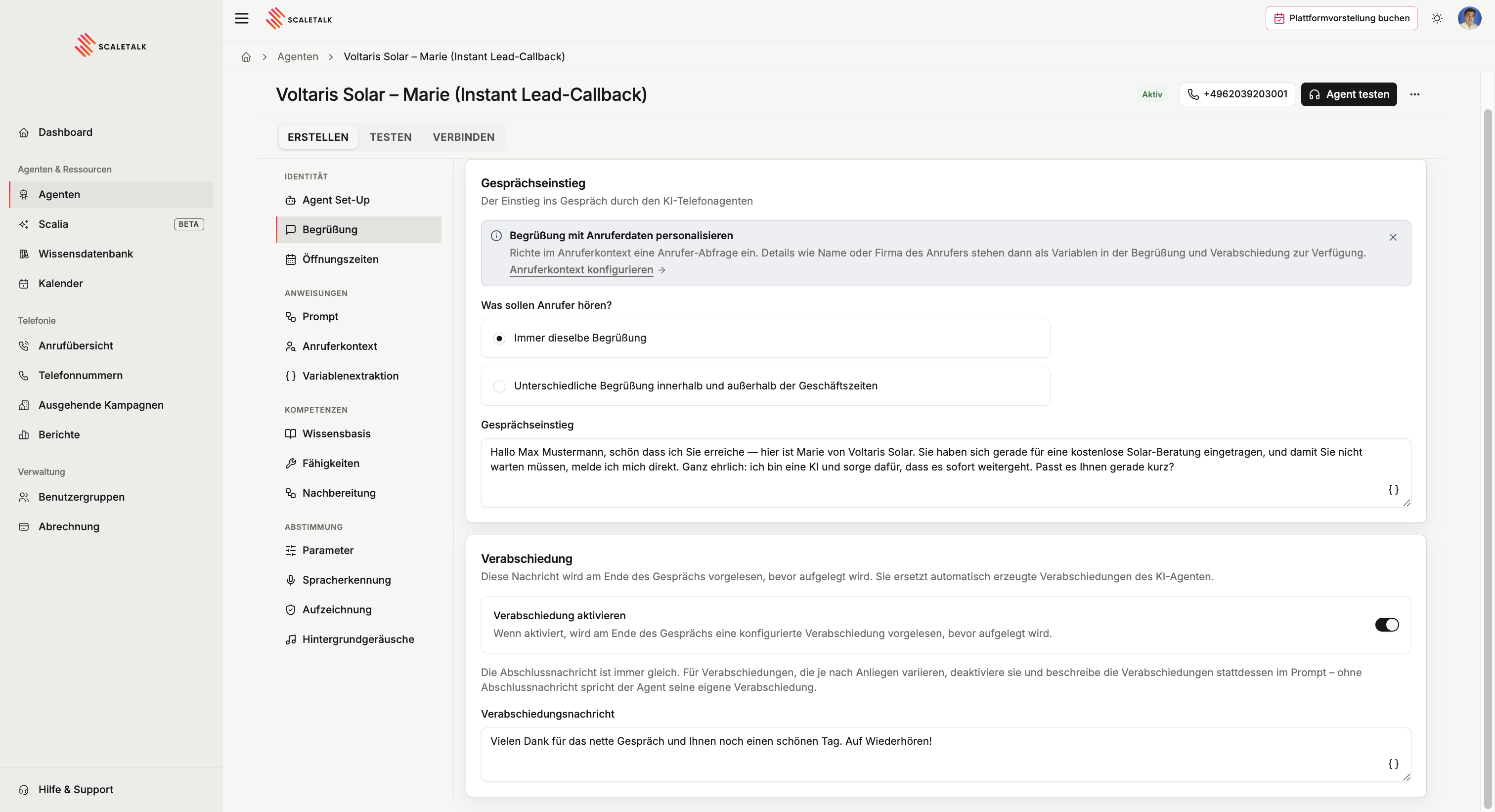
Opening line
The opening line is the first sentence after the agent picks up. It decides whether the caller immediately knows where they have landed.
A good opening does three things in one sentence: it names the agent, it names the company, and it asks an open question.
Hello, this is Marie, the digital assistant at Nordlicht Interior.
How can I help you today?
Keep it short, and end on an open question
In the first seconds callers mostly listen for whether they are in the right place. Whatever comes after that, they miss. Long greetings with opening hours, privacy notices and menu options cost patience and buy nothing.
End the opening on an open question — "How can I help you?" rather than "Would you like an appointment?". An open question invites the caller to explain freely, and that is exactly what lets the agent recognise the request. A closed question pushes them into a box that is often the wrong one.
Required: the AI must identify itself as AI
The EU AI Act applies from 2 August 2026. It requires that it is transparent to the caller that they are speaking to an artificial intelligence and not to a person.
In practice a phrase in the opening line is enough — "the digital assistant at …", "your AI assistant", or "I am an artificial intelligence". Digital assistant works well: clear enough for the transparency requirement without disrupting the flow.
It is good practice regardless. Responsibility for implementing it sits with you as the operator of the agent; ScaleTalk provides the technology but is not liable for the wording.
One greeting or two
Under What should callers hear? you choose between two modes:
| Mode | Behaviour |
|---|---|
| Always the same greeting | A single opening line, regardless of the time of day. |
| Different inside and outside business hours | Two separate texts. Which one plays is decided by the weekly schedule under Opening hours. |
The second mode pays off as soon as callers should expect something different after hours, such as a callback instead of immediate advice.
Caller data in the greeting
If you have set up a caller lookup under Caller context, the returned fields are available as variables. That lets the agent greet known callers by name:
Good morning {{FirstName}}, good to hear from you again.
What can I help you with today?
Always plan for an empty value
For an unknown caller the variable is empty. Write the opening so it still reads as a complete sentence without the value, or use the fixed greeting mode for unknown callers.
Building in recording consent
If you record calls you need the caller's consent. Under recording you store a notice sentence and get a variable to place here in the opening line:
Hello, this is Marie, the digital assistant at Nordlicht Interior.
{{RecordingNotice}}
The agent then speaks the notice as part of the greeting and acts on the answer: consent given, the call is recorded; refused, it is not. Whether consent was given is recorded in the transcript.
If you do not place the variable, the notice is appended automatically — but then you do not control where it lands.
Sign-off
The sign-off is the last sentence before hanging up. It is off by default. Once enabled, the agent always speaks exactly this text instead of composing its own closing.
Thank you for calling Nordlicht Interior.
Have a great day. Goodbye!
Which variant to pick:
- Sign-off enabled when every call should end the same way, for instance with a fixed notice or a brand phrase.
- Sign-off disabled when the ending should depend on the caller's request. Describe the closings you want in the prompt instead, for example an appointment confirmation after a booking and a callback note after a complaint.
Where to go next
Opening hours
The weekly schedule that decides which greeting plays.
Caller context
Look up caller data and expose it as variables.
The agent can always hang up — the question is when
Ending the call is a built-in ability of every agent. This field does not change that; it only sets what is said while doing it.
When it hangs up is driven solely by the prompt. That is where you describe the conditions — usually: ask "Is there anything else I can help with?" once, wait for the answer, and only end on a clear no. Without that rule the agent hangs up as soon as it considers the request handled, cutting callers off.