Knowledge base
Equip your agent with custom documents and knowledge.
The knowledge base is the document store that your agent accesses during conversations. When a caller asks a question, the agent searches the uploaded documents and uses the relevant information in its response.
A template to fill in
If you would rather not start from nothing: the knowledge base template as PDF carries every section that holds up in practice — opening hours, services, responsibilities, common questions. Fill it in, upload it, done. It is in German.
Prefer a text editor? There is also a Markdown version.
Core Principle
What isn't in the knowledge base, the agent cannot know. What is incorrect in it, the agent will say incorrectly. The quality of your knowledge base determines the quality of the responses.
How It Works Technically
When you upload a document, ScaleTalk processes it in several steps:
| Step | What Happens |
|---|---|
| Upload | The file is uploaded to secure storage |
| Extraction | Text content is extracted (OCR for images/scans) |
| Chunking | Content is split into searchable sections |
| Embedding | Sections are converted into vectors for semantic search |
| Ready | The document is indexed and available for agents |
After that, any agent with access to the knowledge base can search these documents during calls.
Supported File Formats
| Category | Formats |
|---|---|
| Documents | PDF, DOCX, PPTX |
| Images (OCR) | PNG, JPG |
| Spreadsheets | XLSX, CSV |
| Text Files | TXT, MD, JSON |
Maximum file size: 50 MB per file.
Managing Documents in the Agent Tab
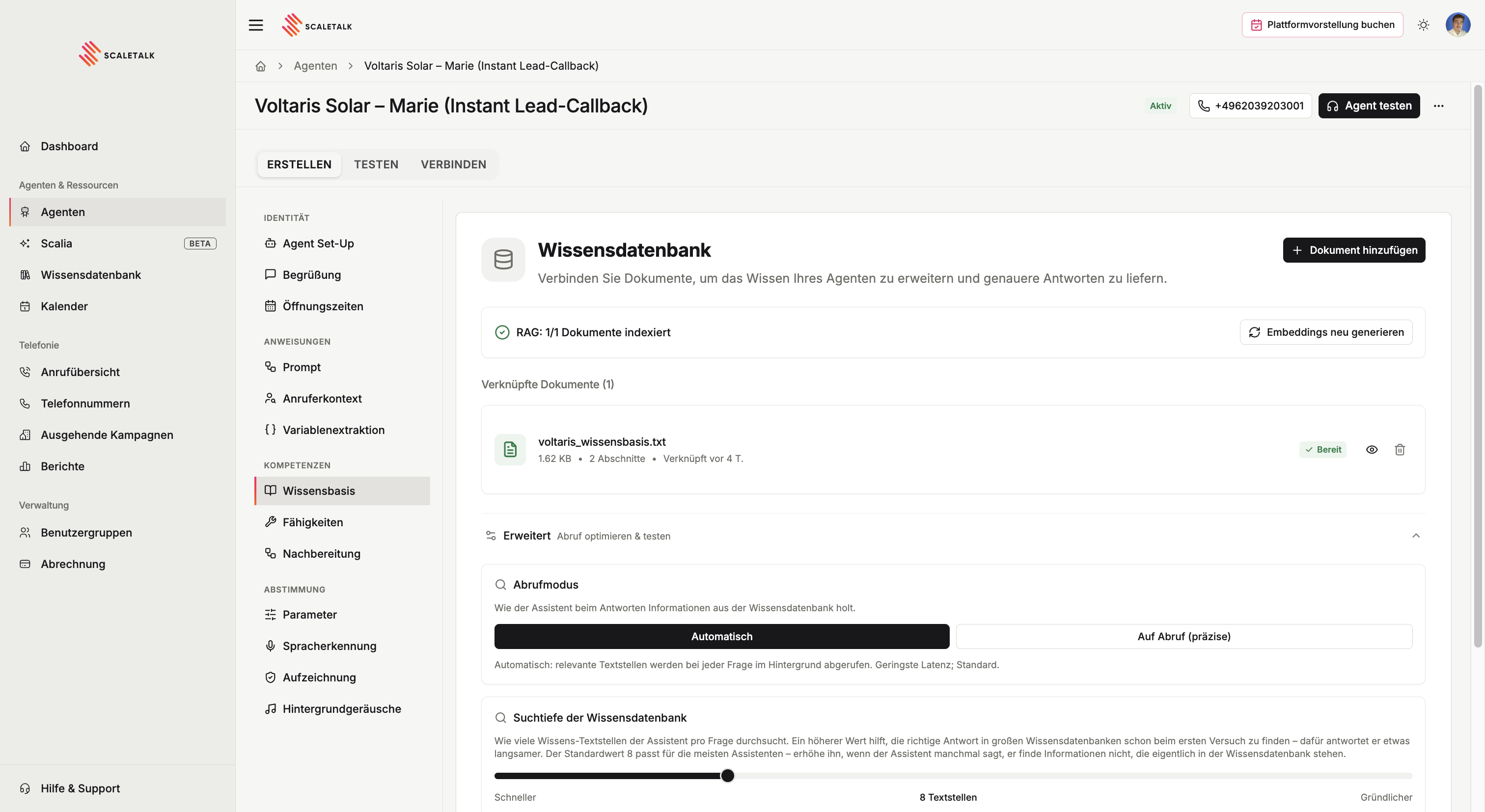
In the Knowledge Base tab of your agent, you can add documents. Click + Add Document — a menu opens with two options:
- Upload New Document — Upload a file via drag-and-drop or the file dialog
- Select from Library — Link an already uploaded document from your workspace to this agent
After uploading, the document is automatically processed:
- The document is uploaded
- Text is extracted and split into searchable sections
- The status changes from "Pending" through "Processing" to "Ready"
Website Crawling and Advanced Management
Features like website crawling, detailed document search, and advanced filtering can be found in the separate Knowledge Base menu item in the sidebar — not here in the agent tab. There you can, for example, import website content and manage your entire document library.
Learn more: Knowledge Base · Uploading Documents · Managing Documents
Document Status
| Status | Meaning |
|---|---|
| Pending | The document is queued for processing |
| Processing | Text is being extracted and embeddings are being generated |
| Ready | Fully indexed, available to the agent |
| Failed | An error occurred during processing |
Checking indexing
Above the document list you can see how many documents are actually searchable — e.g. "RAG: 3/3 documents indexed", along with the number of chunks and tokens.
If it says 0 of 1, the agent finds nothing
An uploaded document is not automatically a usable document. If the counter shows fewer indexed documents than you have, click Regenerate embeddings and wait for processing to finish. Only then can the agent reach it.
Advanced: tuning and testing retrieval
Advanced in the knowledge tab holds the controls for how the search runs. On a small knowledge base you can ignore them; on a large one they decide answer quality.
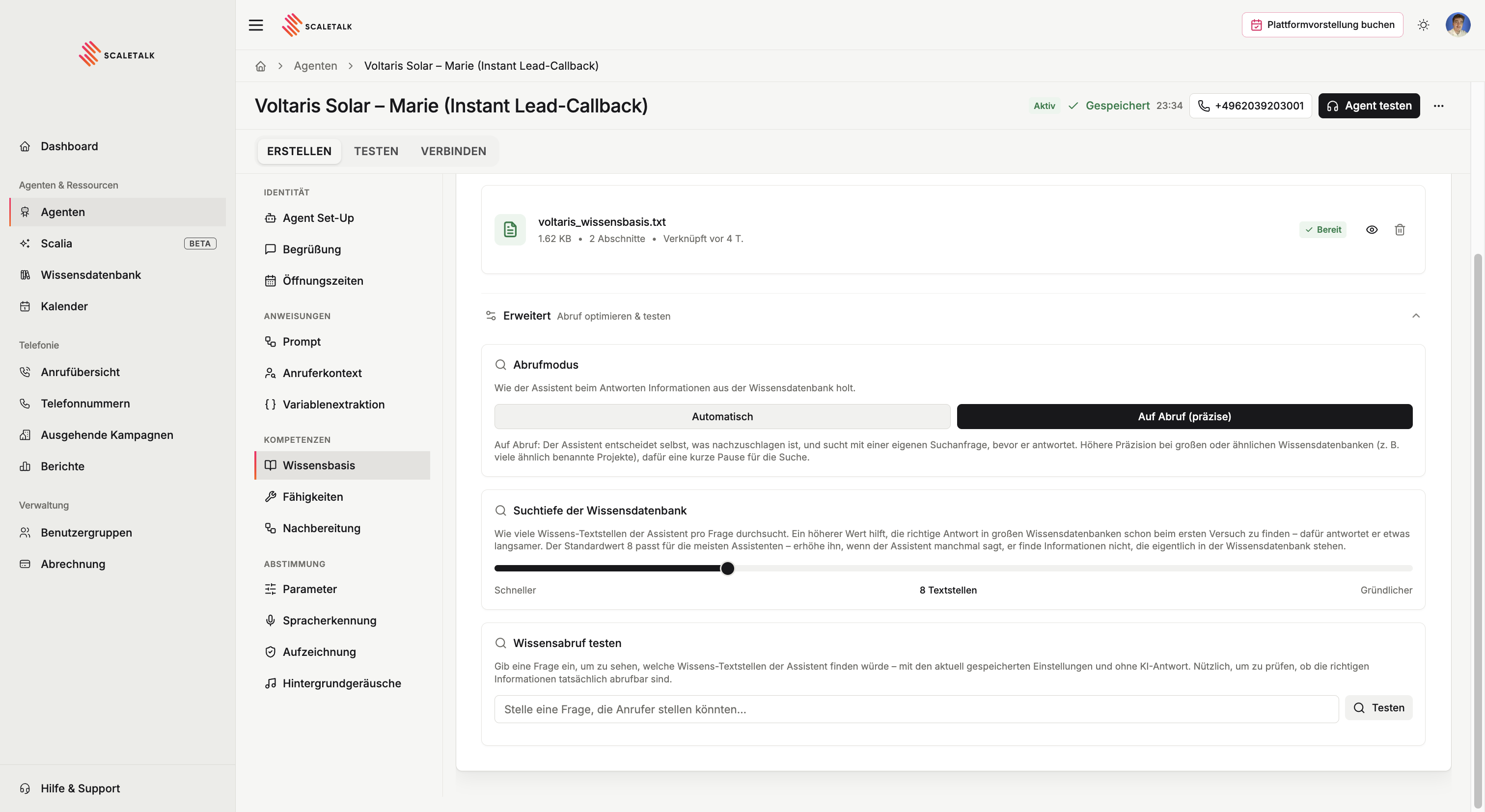
Retrieval mode
| Mode | Behaviour | When |
|---|---|---|
| Automatic (default) | Relevant passages are fetched in the background on every question. Lowest latency. | The normal case |
| On demand (precise) | The agent decides what to look up and issues its own search query before answering. | Large knowledge bases, or many similarly named entries |
On demand is more accurate but costs a short pause for the search. With many similar-sounding projects, products or locations, that moment is worth it.
Search depth
How many passages the agent searches per question. The slider runs from Faster to More thorough, with a default of 8 passages.
- Lower: fewer passages, faster answers — fine for small, well-structured knowledge bases
- Higher: a more thorough search, slightly slower — needed when a lot of similar material sits side by side
The trigger for turning it up
If the agent occasionally says it cannot find something that is demonstrably in the knowledge base, search depth is the first slider to move.
Test retrieval
Just below, you can enter a question and see which passages the agent would find — with the saved settings and without an AI answer. That cleanly separates two failure modes:
- The right passages come back but the answer is still wrong → the prompt is at fault
- The wrong passages, or none, come back → the knowledge base or the search depth is at fault
If nothing comes back, rephrase the question or raise the search depth.
Best Practices: Structuring Content
What Belongs in the Knowledge Base?
The knowledge base is suited for established factual knowledge that doesn't change with every call:
Company Information
- Company name, address, contact details
- Business hours and availability
- Directions and parking situation
- Team overview: Who is responsible for which area
Services and Products
- Service overview with brief descriptions
- Price lists (where fixed prices exist)
- Package offerings and their scope
- Typical process of a service
Frequently Asked Questions (FAQ)
- The 10-20 most common questions received by phone
- Clear, concise answers to each question
- Questions about returns, warranties, delivery times, etc.
Policies and Processes
- Cancellation terms and deadlines
- Warranty conditions
- Complaint process
- Privacy notices (what the agent is allowed to say about them)
What Does NOT Belong in the Knowledge Base
Dynamic data (e.g., current stock levels, delivery status) — use API Requests for that. Instructions for the agent (e.g., conversation flow, behavior rules) — those belong in the system prompt. Confidential internal documents that callers should not hear.
How to Structure Content
ScaleTalk splits documents into sections (chunks) and searches them semantically. Therefore, structuring is crucial.
One Topic per Section
| Do This | Not This |
|---|---|
| One section per topic with a clear heading | Mixing multiple topics in one paragraph |
| All relevant info about a question in one place | Spreading info about a question across multiple documents |
| Short and concise: 3-5 sentences per section | Pages of continuous text without structure |
Clear Headings
Use headings that reflect the question a caller would ask:
# Business Hours

Monday to Friday: 08:00 AM – 06:00 PM
Saturday: 09:00 AM – 01:00 PM
Sundays and public holidays: Closed

# Parking

There are 5 free customer parking spots directly in front
of the building. Alternatively, there is the underground
parking garage at the market square (2-minute walk, paid).

# Returns and Exchanges

Products can be returned within 14 days of purchase.
Requirement: Original packaging and receipt.
No Duplicates
Each piece of information should appear exactly once in the knowledge base. If the same information is worded slightly differently in two documents, it can lead to contradictory answers.
FAQ Format
For frequently asked questions, a simple question-and-answer format works best:
# Frequently Asked Questions

## Do you have parking?
Yes, directly in front of the building. 5 free spots.

## How long does an initial consultation take?
About 30 minutes. The initial consultation is free.

## Can I reschedule my appointment?
Yes, free of charge up to 24 hours before. Later
cancellations cost 30 euros.

## Do you also offer home visits?
Yes, within a 20 km radius. Surcharge: 25 euros.
Tip
Think of the 15 most common questions received by phone. Write a clear, short answer for each. In practice, this covers 80% of all knowledge-related questions.
Formatting Price Lists Correctly
Prices are one of the most common reasons for calls. Structure them so the agent can reliably find them:
# Price List

## Women's Haircuts
- Wash, Cut, Blow-dry: 52 euros
- Wash, Cut, Blow-dry (long hair): 62 euros
- Trim ends: 25 euros

## Men's Haircuts
- Classic men's haircut: 28 euros
- Clipper cut: 18 euros

## Coloring
- Highlights from: 65 euros
- Full coloring from: 55 euros

Note: All prices include VAT.
For elaborate coloring, we provide a
customized quote on site.
The "from" for variable prices and the note at the end prevent the agent from quoting fixed prices where only guide prices exist.
Team and Responsibility Information
If your agent should route calls to the right person, it needs clear responsibility information:
# Team and Responsibilities

## Mr. Mueller – Managing Director
Responsible for: Quotes, contracts, complaints
Available: Mon–Fri, 09:00–16:00

## Ms. Schmidt – Accounting
Responsible for: Invoices, reminders, payments
Available: Mon–Thu, 08:00–14:00

## Mr. Weber – Technical
Responsible for: Outages, technical support, maintenance
Available: Mon–Fri, 07:00–17:00
Common Mistakes
| Mistake | Problem | Solution |
|---|---|---|
| Too much at once | Agent finds wrong sections | Only upload relevant knowledge |
| Duplicates | Contradictory answers | Each piece of info only once, always up to date |
| No structure | Incoherent answers | Headings + 1 topic per section |
| Outdated data | Wrong prices or business hours | Review and update regularly |
| Dynamic data in KB | Stock levels, status outdated | Use API Requests |
| Pages-long PDFs | Poor chunk quality | Split into sections or use Markdown |
Checklist
- Business hours and availability documented
- Address, directions, and parking situation described
- Service overview with prices available
- 10-20 most common questions prepared as FAQ
- Team and responsibilities documented
- Cancellation terms and deadlines documented
- Each piece of information appears only once (no duplicates)
- Each section has a clear heading
- Documents are up to date — no outdated prices or hours
- Test call made and FAQ questions asked
Update Regularly
Plan a quick check of your knowledge base every 4-8 weeks. Have prices changed? Business hours? Team composition? Outdated information is worse than missing information.