Variable extraction
Define the structured fields your agent captures during a call and stores afterwards.
Under Instructions → Variable extraction you define the structured fields your agent should capture from callers. They are stored with every call and are available afterwards in follow-up — in emails, webhooks and exports.
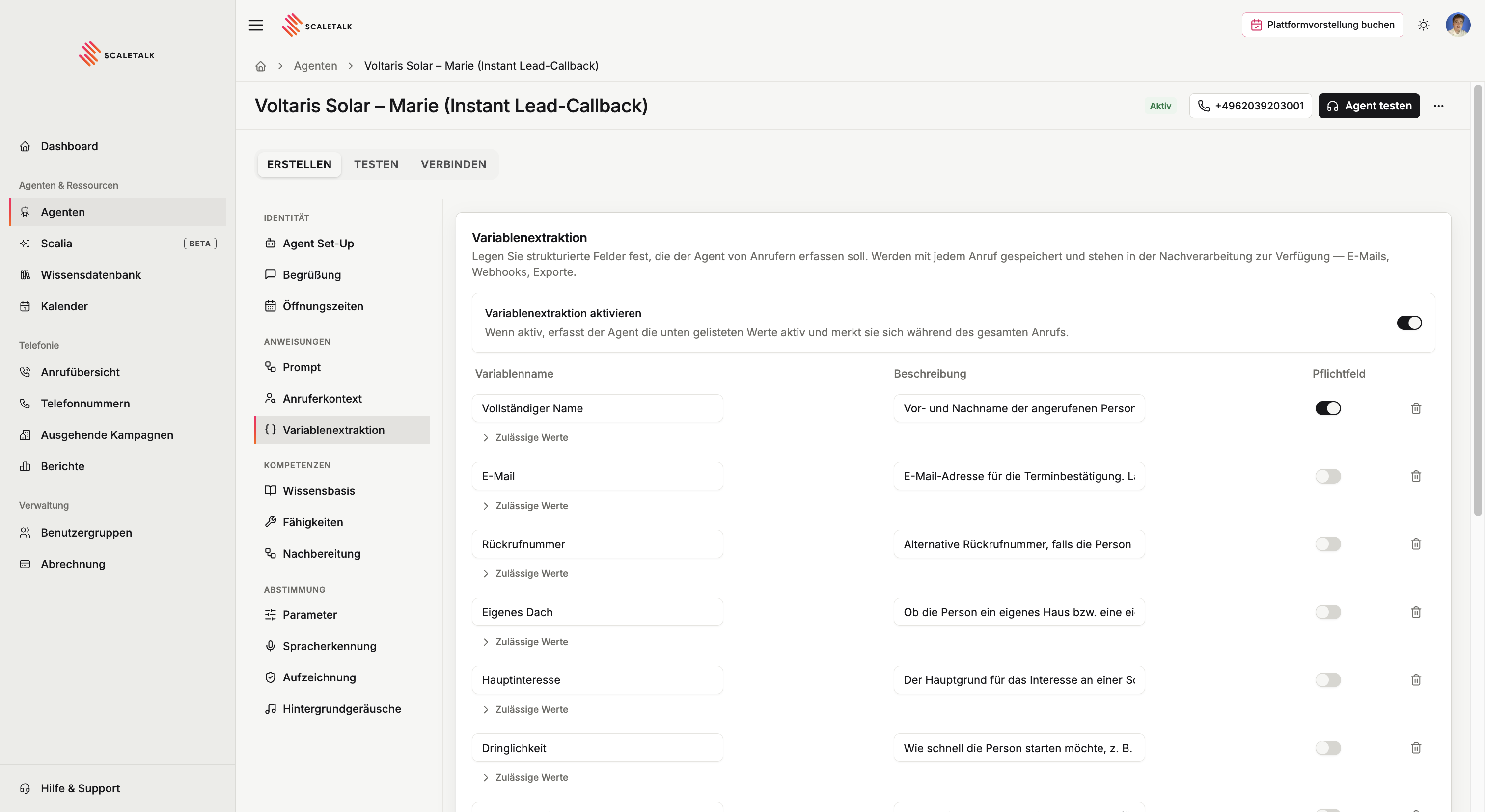
It is one of the most underrated features on the platform. Take it seriously and you get not just better call logs but noticeably better conversations.
What a configured variable does
A variable does three jobs at once:
- Conversation memory. The moment the caller says the value, the agent files it — and never asks a second time.
- Clean capture. Through the description you tell the agent what structure to capture the value in. A registration plate, a case number or an email address then lands in the right format instead of as phonetic mush.
- Structured field. After the call the value stands on its own and other systems can read it — in emails, webhooks, exports and filters.
The first two are what most people miss. The longer a call runs, the harder it gets for a fast language model to keep everything in view — and voice agents need fast models. Configured variables are the anchor against that. And without a format instruction the agent guesses how to write down "H for Heinrich, D for Dora, P for Paula, 3051".
When the agent forgets things or asks twice
It almost always comes back to this page. Do not hesitate to configure plenty of variables — it is the most direct lever against an agent that re-asks what has already been said.
Three tiers of memory
Not everything said in a call carries the same weight:
| Tier | What it is | Where it goes |
|---|---|---|
| Captured | The caller said it, it passed the check, and there is a matching configured field | The database, exports, webhooks |
| Noted | Said and checked, but no field exists for it | For the duration of the call only |
| Observed | Inferred, or the audio was too poor to trust | For the duration of the call only |
All three are available to the agent during the call. Only the first tier is stored. If you need a value later, it needs a field.
When to add a variable
Whenever the agent needs to remember something reliably during the call, whenever you need it downstream as a structured field (a customer name in a CRM row, an appointment in a confirmation email) — or both. You don't have to list every detail. Configuring one turns "probably remembered" into "reliably captured and exported".
Enabling it
The Enable variable extraction switch controls the whole feature. Off, the agent ignores the list below entirely. On, it actively captures the listed values and keeps them in view for the whole call.
The fields on each variable
| Field | Meaning |
|---|---|
| Variable name | The key the value is stored under — e.g. CustomerName, PolicyNumber, AppointmentDate |
| Description | What the value means and when it should be captured |
| Required | Whether the agent must ask for it before it may hang up |
| Allowed values | An optional list of fixed answers |
The name drives the behaviour
This is the most important thing on the page and the least visible: the variable name is not just a label. ScaleTalk reads the name to work out what kind of field it is, and switches on the matching checks and repairs.
| If the field holds… | Name it… | And you get |
|---|---|---|
| The caller's own callback number | CallbackNumber, callback_number | Auto-fill from the caller ID when they just say "yes" |
| Some other party's number | EmergencyNumber, Doctor_Phone | No auto-fill — the qualifier vetoes it |
| An email address | Anything containing mail | Reconstruction from spelling, plus verbatim read-back |
| A person's name | Anything containing name | Protection against vocatives and misheard spellings |
| A date of birth | DateOfBirth, birth_date | Checks for impossible dates and dates never stated for this field |
| A requested appointment | PreferredAppointment — not …Date | Ordinary date handling, no identity check |
| A contract or customer number | ContractNo, CustomerNumber | Requires real numeric content, plus digit reconciliation |
| A reachability window | Reachability | Number reconciliation, but "mornings" stays a valid value |
| Free text about the request | Request | Full free-text checking, including German compound derivation |
An example of how strongly the name acts
Name a field DateOfBirth and the identity check applies: if the caller mentions a date in passing about some unrelated incident, it is not stored as their date of birth. Name the same field PreferredAppointment and that check is gone — which is exactly right for a requested slot.
Writing the description
The description is not decoration. It is injected into the agent's instructions on every single turn, and several field-type detectors read it.
Say what the value IS — not what the agent should do
The agent already knows how to ask. What it needs from you is how to recognise the answer.
✅ The customer's contract number, 6–8 digits, printed top right
   on the invoice.

❌ Politely ask the caller for their contract number and confirm it.
Keep other field types out of the prose
✅ Callback number in case we have to call back.

❌ Callback number. If the caller gives no phone, ask for their
   date of birth for identification.
The second turns the phone field into a date field as well — and the spoken-date normaliser starts rewriting values.
Name the caller's words, not just yours
The agent also uses the description to recognise its own outgoing question. If the field is ContractNo but callers say "policy number", that word belongs in the description.
✅ Contract number. Callers often call it a policy number or
   insurance number.
Spell out the format
This is where the description earns its keep. For licence plates, case numbers or customer numbers, describe the shape — and the agent captures it cleanly instead of guessing letter by letter:
The vehicle's official registration. German plates are one to
three letters for the registration district, one to two
identifying letters and one to four digits. Capture it in
exactly that structure.
Offer the caller's own number explicitly
✅ Callback number. If the calling number is usable:
   {{fromNumber}}.
That placeholder does real work: when the caller confirms the displayed number with a bare "yes", the platform substitutes the actual number instead of storing the string "yes".
Do not write {{toNumber}} there — that is the number the caller dialled, not theirs.
Keep it short
The description is re-sent on every turn of the call. Long descriptions cost time on every single turn and push the genuinely important context further away. Two sentences is plenty.
Required or optional
If a variable is marked required, the agent will not end the call before it has the value. It asks again — within limits — and then lets the caller go if they refuse.
Leave a field optional when the agent should capture it if it comes up, but must never force it. Callback numbers and extra notes are typical optional fields; the caller's name is a typical required one.
Don't make everything required
Required is not a hint, it is a commitment: the agent fights for the value before the call may end. With five required fields the conversation feels like a form. Two or three is the practical maximum.
Allowed values
Open Allowed values under a variable to list the answers this field may take — insurance type, department, request category. The agent may then store one of those values even if the caller phrases it differently.
This matters more than it sounds: without the list, the agent may only store words the caller actually said. A correct but differently worded answer gets discarded.
| Without allowed values | With allowed values | |
|---|---|---|
| Caller says | "I'm on public health insurance" | "I'm on public health insurance" |
| Stored value | nothing — the value is discarded | Statutory |
Description and list belong together
Keep naming the possible values in the description as well. That is where the agent learns which ones exist — the allowed values list is what additionally makes them storable.
The three rules
1. Every classifying field needs a list. If a human would answer it from a dropdown, it needs allowed values.
2. No free-text field gets a list. On Request as a free summary, or a damage description, the list would silently gate real caller data.
3. Two values means yes/no. A pair like Existing customer / Not an existing customer, or plain Yes / No, is treated as a truth value and checked more strictly — otherwise a "no" would have stored the positive value simply because it was on the list. If you want three outcomes, add a third value, even if it is just Unclear.
'e.g.' destroys the list
Do not write allowed values as examples in the description. Text containing "e.g.", "for example", "such as" or "etc." is read as illustrative — no value list is created.
✅ Allowed values: Statutory · Private · Self-pay
   Description: "The patient's insurance type."

❌ Description: "Insurance type, e.g. statutory or private."
For free-text fields such as name, email or phone number the list stays empty. Values can be reordered with the arrows and removed individually; duplicates and entries without a letter or digit are discarded on save, and the interface flags them beforehand.
Example configuration
| Variable name | Description | Required | Allowed values |
|---|---|---|---|
FullName | First and last name of the person called | yes | — |
Email | Email address for the appointment confirmation | no | — |
CallbackNumber | Alternative number. If the calling number is usable: {{fromNumber}} | no | — |
Request | What the call was about, in one or two sentences | no | — |
Category | How the request is classified | yes | Sales, Support, Accounting, Other |
Urgency | How pressing the matter is | no | Low, Medium, High |
Why a value does not get stored
ScaleTalk checks every value before storing it. The governing rule: the transcript is the truth. Anything with no trace in the conversation is not stored, however confident the model is. That heads off the classics: phone = "unknown", the agent's own question filed as the answer, or a date of birth the caller mentioned about something else entirely.
| Symptom | Likely cause | Fix |
|---|---|---|
| A classifying value is never stored | No allowed values configured | Add the list under Allowed values |
| A yes/no field stores the opposite | Two values that are not a recognisable opposite pair | Use X / Not X, or add a third value |
| Callback field stores "yes" instead of a number | The name matches no callback keyword and the description has no {{fromNumber}} | Rename it or add the placeholder |
| The agent re-asks something already answered | The value was rejected on check | Sharpen the description, check the field name |
| Digits come out transposed | Recognition error while the caller spelled it | Usually self-corrects by the end of the call |
A value can still be corrected after capture
The transcript keeps improving during the call. ScaleTalk therefore reconciles numbers and email addresses again at the turn boundary, and one final time at the end of the call. A value that looked wrong mid-call can end up correct in the database.
Where the values end up
Captured variables show up again in four places:
- In the call overview — as captured variables on the call and as filters
- In the email subject and body of follow-up, e.g.
{{Request}} - In the webhook payload sent to a CRM, ticketing system or n8n
- In CSV exports of your calls
Related pages
Speaking rate, temperature, time limits, pronunciation, recording and background audio live under Tuning & fine-tuning. Caller details known before the greeting are set up in caller context.