Cold transfer
Put the caller straight through — with no heads-up for the person receiving them.
On a cold transfer the agent puts the caller straight through. The person answering does not know who is calling or what it is about — the conversation starts over.
If the person should know what is coming, use a warm transfer instead.
Creating a transfer
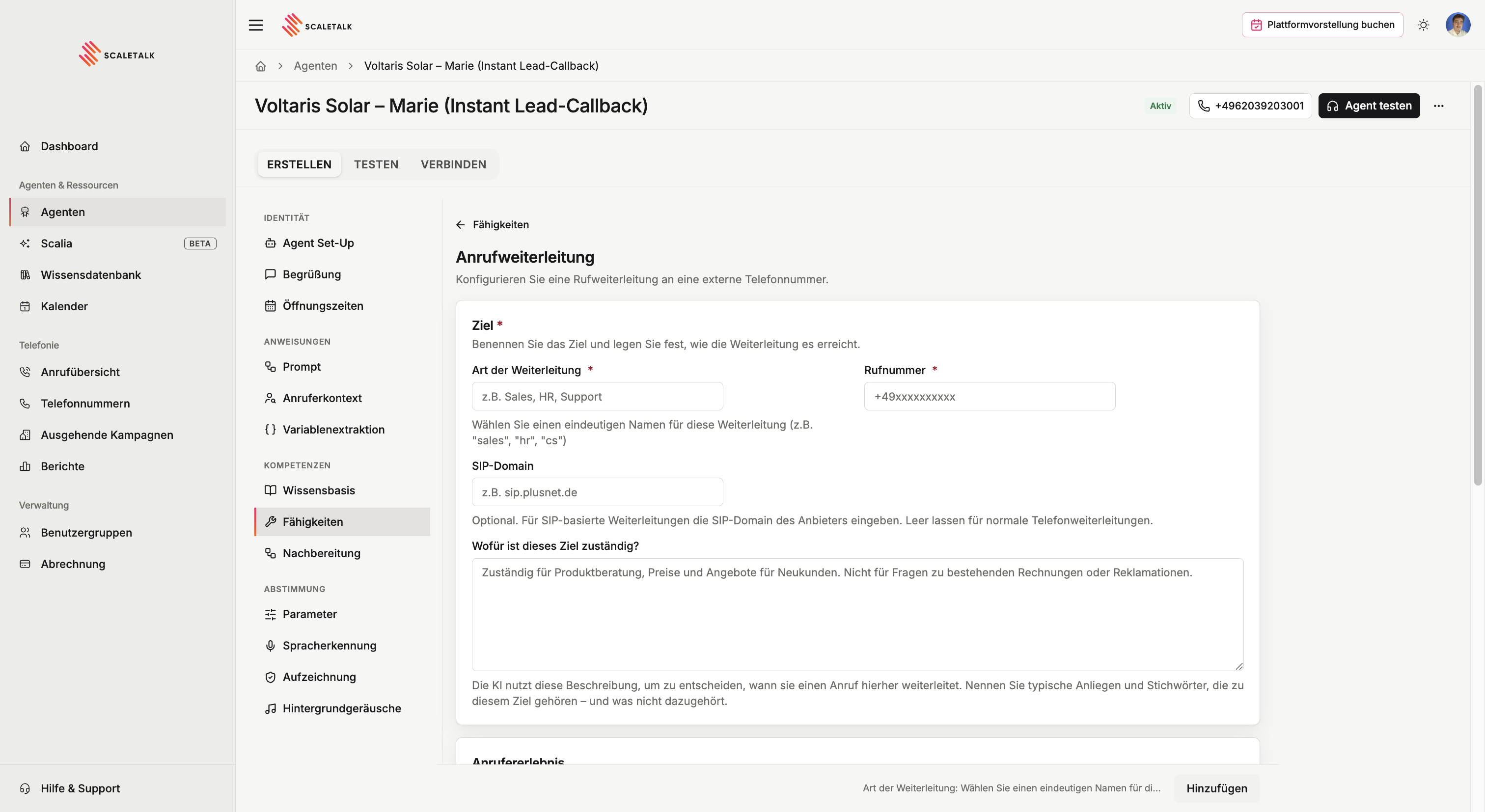
Capabilities → Tools → Call transfer → +. You can create as many destinations as you like — accounting, sales, support, management.
The dialog has three sections.
Destination
| Field | Meaning |
|---|---|
| Transfer type | A unique name, e.g. Accounting. Internal only — this is what you reference in the prompt. |
| Phone number | Where the phone rings |
| SIP domain | Optional. Only for SIP-based transfers through a specific provider, often on landlines. Otherwise leave empty. |
| What is this destination responsible for? | How the AI recognises that a call belongs here |
The number needs international format
+49 followed by the number without a leading zero and without spaces: +491701234567, not 0170 1234567 and not +49 170 1234567.
The responsibility description is what the language model bases its decision on. Name typical requests and what explicitly does not belong here:
Responsible for product advice, pricing and quotes for new customers.
Not for questions about existing invoices or complaints.
Caller experience
| Field | Meaning |
|---|---|
| Pre-transfer announcement | Read out verbatim before the transfer starts |
| Transfer failure message | Read out when nobody could be reached |
Both are optional. Leave them empty and the agent phrases things itself, driven by the prompt.
The most common misconfiguration: the double announcement
If a pre-transfer announcement is set, do not additionally instruct the agent in the prompt to announce the transfer. The caller would hear both, one after the other.
In that case put this in the prompt explicitly: "Do not speak your own announcement. The connection announcement is configured and is played automatically."
A failure does not end the call
If the agent reaches nobody, it speaks the failure message and the call continues. You can then take the request, offer a callback, or try another destination. Only a successful transfer ends the agent's role.
Availability
Here you set when this destination may receive transfers at all: always, only inside opening hours, only outside them, or on its own schedule.
Transfer hours apply to warm and cold transfers together and use the agent's timezone. Outside the window the agent does not transfer but plays the transfer unavailable message — left empty, it uses a sensible default.
Several destinations
Create one destination per department and describe the boundaries cleanly:
| Name | Responsible for | Number |
|---|---|---|
Accounting | Invoices, receipts, ongoing bookkeeping | +496203111222 |
Sales | Pricing, quotes, new customers | +496203111333 |
Management | Escalations, complaints | +491701234567 |
Referencing it in the prompt
Configuration alone triggers nothing. The system prompt sets the condition and names the exact transfer:
### When the caller has a question about documents already
### submitted, receipts, or ongoing bookkeeping:
- Call the "Accounting" transfer.
- Do not speak your own announcement. The connection
  announcement is configured and is played automatically.

### If the transfer fails:
- Apologise briefly, take the name and request, and promise
  a callback.
Always define the failure case
Without an instruction for the failure the agent gets stuck. Define it in the prompt or via the failure message.
Trick: transfer to another AI agent
You can also enter the number of another ScaleTalk agent as the destination. That gives you a team of specialists: a reception agent answers and puts people through to a booking or support agent depending on the request.
For the caller this is an ordinary transfer — the second agent starts fresh and knows nothing from the first, so anything already captured is lost. Either use a warm transfer for the handover, or design the second agent to collect what it needs itself.