Warm transfer
Hold the caller, brief the colleague, then connect them.
On a warm transfer the agent hands the call over with context rather than in silence. The caller waits on the line while the agent calls the destination and explains in a couple of sentences what it is about. The person then decides whether to take the call.
How it runs
- The agent announces the transfer and puts the caller on hold — they hear hold music.
- The agent calls the destination number.
- When the person answers, the agent briefs them live: who is calling, what it is about, and whether to put them through.
- The person accepts or declines.
- On acceptance both are connected and the agent leaves. On decline the agent returns to the caller.
The difference from a cold transfer is steps 3 and 4. Cold means: put through, and the person has no idea what is coming.
Warm or cold
| Situation | Recommendation |
|---|---|
| The recipient needs preparing — complaints, sensitive cases | warm |
| Speed matters, e.g. a hotline with clear ownership | cold |
| The person should decide for themselves whether to take it now | warm |
| The caller has already been fully captured and just needs routing | cold |
Warm costs time
The caller waits while the agent briefs the colleague — easily twenty to thirty seconds. Say so in the announcement so nobody feels forgotten.
Configuration
Capabilities → Tools → Warm transfer → +
Destination
| Field | Meaning |
|---|---|
| Destination name | A unique name, e.g. Deadline case. This is what you reference in the prompt. |
| Phone number | International with a leading plus, no spaces: +491701234567 |
| SIP domain | Optional, only for SIP-based transfers through a specific provider |
| What is this destination responsible for? | How the AI recognises that a call belongs here |
Again: name typical requests and the boundary.
Responsible for complaints, escalations and cases that need a
manager — for example when a caller disagrees with a resolution.
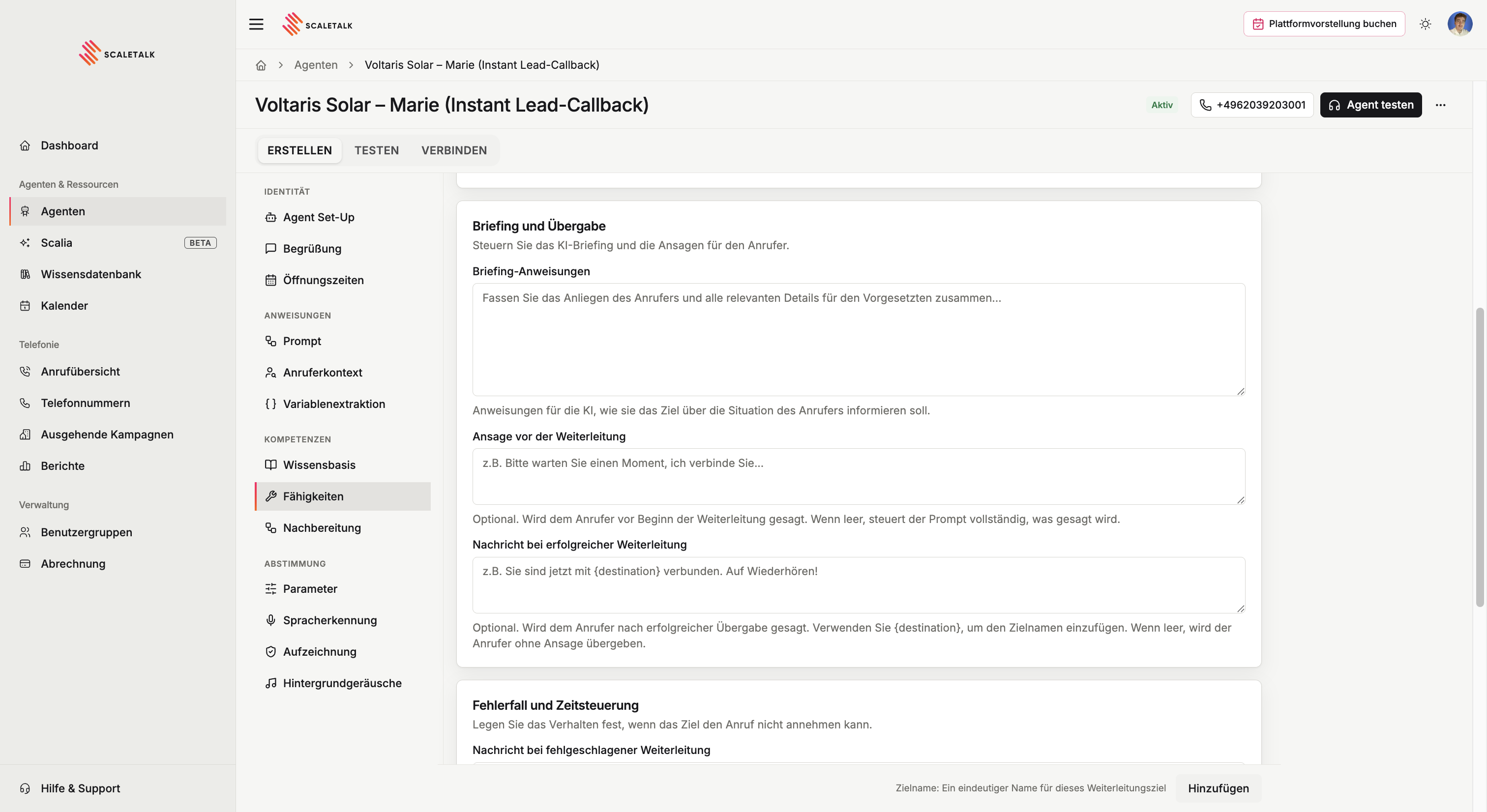
Briefing and handover
| Field | Meaning |
|---|---|
| Briefing instructions | Instructions to the AI on how to brief the destination |
| Pre-transfer announcement | What the caller hears before the hold starts |
| Post-transfer success message | What the caller hears when they are connected |
The briefing instruction is an instruction, not a template
This is not a finished sentence the AI reads out — it is direction on how to brief. The actual wording is produced at handover time from the conversation that took place.
Summarise the caller's request and all relevant details in one
or two sentences. Always say who the caller is, then ask whether
to put them through.
You are free to shape this however you like — you can equally specify that only the name is mentioned and nothing else.
The success message is optional; without it the caller is handed over silently, which is usually enough in practice — they can hear a human has picked up. Use {destination} to insert the destination name.
Failure handling and timing
| Field | Default | Meaning |
|---|---|---|
| Transfer failure message | — | Spoken when nobody answers, the destination declines, or voicemail picks up |
| Ring timeout | approx. 30 s | How long it rings before counting as unreachable. 5–120 seconds. |
The failure message also covers a deliberate decline, so word it to fit both cases:
Sorry, I couldn't reach anyone just now. My colleague will call
you back as soon as possible. Is there anything you'd like me to
pass on?
Left empty, the AI phrases the failure itself, following the prompt.
Availability and routing
As with cold transfers you set when this destination is reachable: always, inside opening hours, outside them, or on its own schedule. Transfer hours apply to warm and cold transfers together.
Under Advanced settings you can additionally override the SIP trunk id and the caller ID number — the number shown to the destination when the agent calls them.
Referencing it in the prompt
### When there is an urgent deadline matter:
1. Capture the caller's full name.
2. Use the "Deadline case" warm transfer.
3. Do not speak your own announcement. The announcement is
   configured and is played automatically.
Conditions that are too broad transfer everything
A condition like "when the agent can't help" is too vague. The agent will transfer at the first follow-up question and the whole point is lost. Name concrete requests.
And as with cold transfers: if an announcement is configured in the tool, do not also instruct the agent in the prompt to announce the transfer — the caller would hear it twice.
Mind your business hours
Transferring to a human only makes sense when someone is there. Either set availability on the tool, or describe in the prompt that outside opening hours the agent takes the request instead of transferring.